nerdctl + Tailscale Sidecar Exit Node: A Complete Pitfall Guide
- EN
- ZH-CN
Table of Contents
In containerized deployments, sometimes you need all outbound traffic from a container to go through a specific network exit. Tailscale’s sidecar pattern makes this possible: a Tailscale container acts as a sidecar, other containers share its network namespace, and traffic flows through a WireGuard tunnel via a remote exit node.
This setup is well-documented for Docker Compose, but migrating to nerdctl (containerd) introduced a series of pitfalls. Here’s what I ran into so others can avoid the same traps.
#
The Goal
Route all outbound traffic from any container through a Tailscale sidecar, forwarding via a remote exit node:
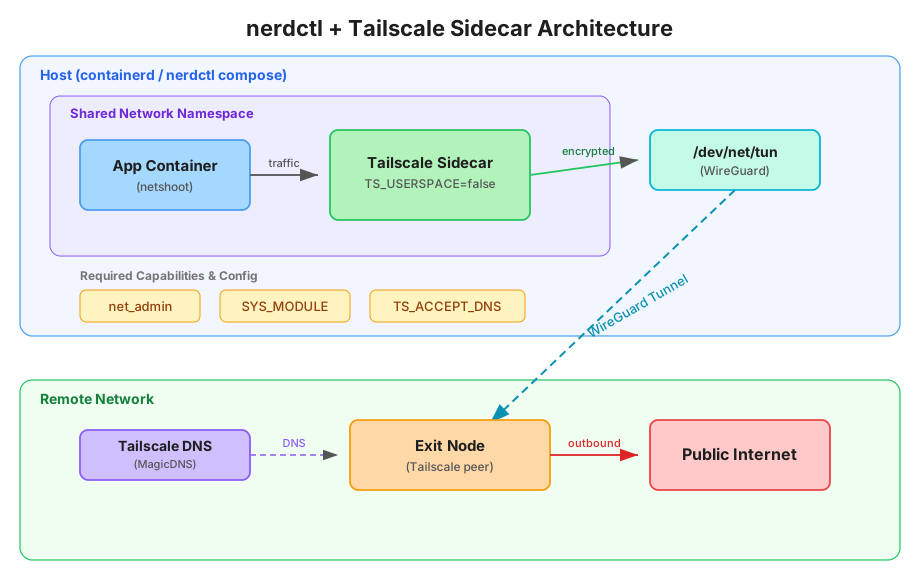
For verification, I used nicolaka/netshoot as a test container — it comes with curl, dig, tcpdump, iperf, and a full suite of networking tools out of the box.
#
Pitfall 1: nerdctl compose doesn’t support network_mode: service:xxx
network_mode: service:xxxDocker Compose supports network_mode: service:<service_name>, which automatically resolves the service name to the corresponding container’s network namespace. nerdctl compose hasn’t implemented this translation layer and throws an error:
unsupported network_mode: service:tailscale-sidecar
Fix: Use network_mode: container:<container_name> instead, and pin the sidecar container’s name with container_name.
services:
  tailscale-sidecar:
    container_name: tailscale-sidecar  # Pin the name
    # ...
  netshoot:
    network_mode: container:tailscale-sidecar  # Use container name, not service name
Without a fixed container_name, nerdctl compose auto-generates names like blockchain-tailscale-sidecar-1, causing reference mismatches.
#
Pitfall 2: Undefined tag in Tailscale ACL
After starting, the Tailscale container immediately exits with:
Received error: requested tags [tag:container] are invalid or not permitted
Fix: Define the tag in your Tailscale admin console’s ACL policy and select it when generating the auth key:
"tagOwners": {
    "tag:container": ["autogroup:admin"]
}
#
Pitfall 3: Missing SYS_MODULE capability
SYS_MODULE capabilityThis one is the sneakiest. The container joins the tailnet fine, tailscale ping works, but after enabling the exit node, TCP traffic is completely broken — only ICMP gets through.
The root cause: kernel mode (TS_USERSPACE=false) needs to load kernel modules like xt_mark and nf_nat to set up iptables forwarding rules. Without SYS_MODULE capability, these modules can’t load. The iptables rules are written but don’t take effect, resulting in working ICMP but broken TCP.
Fix:
cap_add:
  - net_admin
  - SYS_MODULE  # Essential
#
Pitfall 4: DNS failure in exit node mode
With the exit node enabled, all outbound traffic goes through the WireGuard tunnel to the remote exit node. But /etc/resolv.conf still points to local DNS servers (e.g., 10.0.2.3), which are unreachable from the exit node’s perspective. DNS queries naturally fail.
The symptom: curl ifconfig.me reports Could not resolve host, while direct IP access hangs or returns errors.
Fix: Let Tailscale take over DNS so queries also go through the tunnel:
environment:
  - TS_ACCEPT_DNS=true
#
Final Working compose.yaml
services:
  tailscale-sidecar:
    image: tailscale/tailscale:latest
    container_name: tailscale-sidecar
    hostname: tailscale-sidecar
    environment:
      - TS_AUTHKEY=${TS_AUTHKEY}
      - TS_EXTRA_ARGS=--advertise-tags=tag:container --exit-node=${TS_EXITNODE}
      - TS_STATE_DIR=/var/lib/tailscale
      - TS_USERSPACE=false
      - TS_ACCEPT_DNS=true
    volumes:
      - ${PWD}/tailscale-sidecar/state:/var/lib/tailscale
    devices:
      - /dev/net/tun:/dev/net/tun
    cap_add:
      - net_admin
      - SYS_MODULE
    restart: unless-stopped

  netshoot:
    image: nicolaka/netshoot
    depends_on:
      - tailscale-sidecar
    network_mode: container:tailscale-sidecar
    command: sleep infinity
Prepare a .env file in the same directory:
TS_AUTHKEY=tskey-auth-xxxxx
TS_EXITNODE=100.x.x.x
#
Verification
nicolaka/netshoot comes with plenty of network tools, perfect for validation:
# Check exit IP to confirm traffic goes through the exit node
nerdctl exec -it netshoot curl ifconfig.me

# DNS resolution test
nerdctl exec -it netshoot dig google.com

# View routing table
nerdctl exec -it netshoot ip route show table all

# Packet capture for debugging
nerdctl exec -it netshoot tcpdump -i any -n

# Tailscale status checks
nerdctl exec -it tailscale-sidecar tailscale status
nerdctl exec -it tailscale-sidecar tailscale exit-node status
nerdctl exec -it tailscale-sidecar tailscale ping <exit-node-ip>
#
Debugging Methodology
The debugging process itself is worth reviewing. When facing a compound problem like “exit node doesn’t work”, the effective approach is to isolate layer by layer:
- Verify tunnel connectivity first:
tailscale pingconfirms whether the WireGuard tunnel itself works. - Comparative testing: Disable the exit node to determine if the issue is with the exit node or the underlying network.
- Differentiate protocols: ICMP works but TCP doesn’t — points to iptables/kernel module issues.
- Separate DNS from connectivity: Use direct IP access to bypass DNS and isolate each issue.
- Compare against known-working configs: Spotting that a previously working setup had
SYS_MODULEimmediately pinpointed the problem.
Each step narrows the scope, avoiding wasted time in the wrong direction.
#
Final Thoughts
nerdctl compose has matured as a Docker Compose alternative, but gaps remain in edge-case compatibility. The missing network_mode: service: support and different container naming conventions are easy migration traps. For Tailscale in containers with exit node routing, SYS_MODULE and TS_ACCEPT_DNS are two easily overlooked but essential configurations. Hope this write-up helps anyone hitting the same issues.